What Is Phishing
Phishing (from the English word "fishing") is a type of fraud where attackers impersonate trusted organizations or individuals in order to trick victims into revealing confidential information: usernames, passwords, 2FA codes, private keys, or seed phrases. The name reflects the method: just as a fisherman casts bait and waits for someone to bite, phishing attackers send fake messages hoping to catch inattentive users.
In the cryptocurrency industry, phishing is especially dangerous: transactions are irreversible, and a compromised private key or seed phrase means an immediate and permanent loss of all funds. According to Chainalysis, phishing consistently remains among the top three sources of losses in the crypto industry.
How Phishing Works
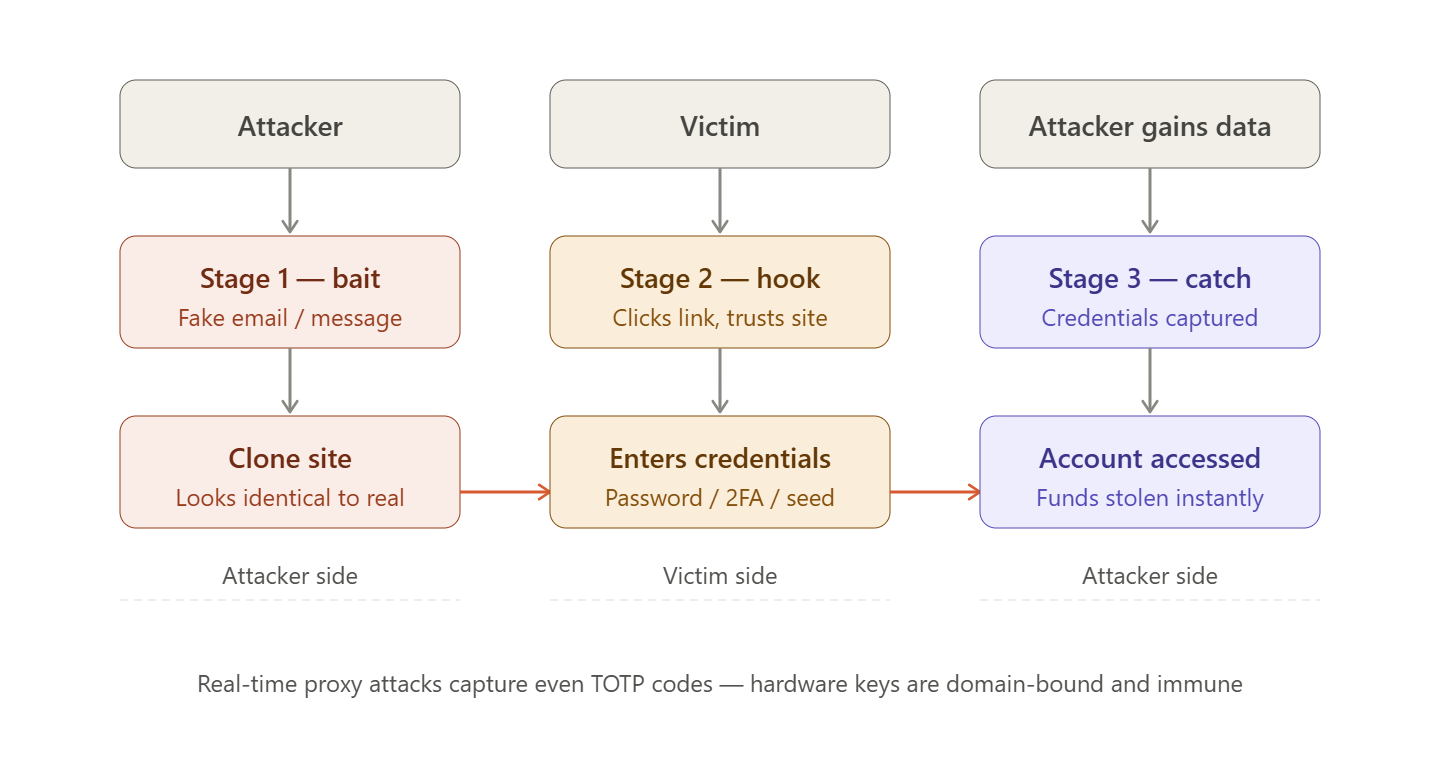
Every phishing attack consists of three stages:
- The Bait — the attacker creates a convincing message or environment that imitates a legitimate source
- The Hook — the victim performs the targeted action: clicks a link, enters credentials, or signs a transaction
- The Catch — the attacker obtains the data or assets and immediately uses them
The key element is the imitation of trust. Phishing attacks exploit the logos, visual style, domain names, and communication tone of well-known platforms so that victims do not notice the substitution.
Main Types of Phishing in the Cryptocurrency Industry
Email Phishing
Mass email campaigns sent on behalf of exchanges, wallets, or well-known projects. This is the most common type of phishing.
Typical Scenario:
- An email from "Cifra X Security" reports suspicious activity on your account
- It requires you to urgently verify your identity by following a link
- The link leads to an exact copy of the exchange website
- The victim enters their login, password, and 2FA code — the data is intercepted in real time
Signs of Email Phishing:
| Sign | Example |
|---|---|
| Suspicious sender domain | [email protected] instead of the official domain |
| Urgency and threats | "Your account will be blocked in 24 hours" |
| Link mismatch | Text says "cifraX.com", but the actual URL is different |
| Generic greeting | "Dear user" |
| Request for confidential data | "Enter your seed phrase for verification" |
Clone Websites (Clone Phishing)
Creating visual copies of legitimate websites with minimal differences in the URL. Users do not notice the substitution and enter their data directly into the attacker's form.
Common Domain Spoofing Techniques:
| Original | Fake Version | Technique |
|---|---|---|
cifrax.cx | cifra-x.cx | Added hyphen |
cifrax.cx | cifrax.net | Different TLD |
cifrax.cx | c1frax.cx | Letter replaced with a number |
cifrax.cx | cifrax.cx.security-check.io | Trap subdomain |
cifrax.cx | cifrаx.cx | Cyrillic "а" instead of Latin |
⚠️ Homograph Attacks
A particular danger is posed by homograph attacks: the use of characters from other alphabets (Cyrillic, Greek) that visually look identical to Latin characters. An address like сіfrax.cx with Cyrillic characters may look identical to cifraх.cx — but it is a completely different domain. Antivirus software and browsers do not always detect such attacks.
Messenger Phishing (Social Media Phishing)
Scammers create accounts in Telegram, Discord, and X that imitate official channels or exchange employees and contact victims directly.
Scenarios:
- "Support" contacts you via direct messages after you ask a question in a public channel
- A fake account of a project founder announces an "exclusive airdrop"
- A bot "advisor" offers help with a "stuck" transaction
🚨 Cifra X Never Contacts You First
Cifra X employees never initiate conversations through direct messages in Telegram, Discord, or other messengers. Any message claiming to be from "Cifra X Support" in direct messages is a scam. Official support is available only through the website form.
Spear Phishing
A targeted attack against a specific individual or organization. The attacker researches the victim beforehand and creates a personalized message to increase trust.
Example: A scammer sees on Twitter that a user is complaining about a withdrawal issue on Cifra X and immediately sends a direct message pretending to be a support specialist who already knows about the problem.
Search Engine Advertising Phishing
Attackers purchase advertising placements in search engines using keywords such as "Cifra X login" or "MetaMask download". The advertising link marked as "Ad" leads to a phishing website and appears above organic search results.
⚠️ Search Advertising
Never access exchanges or cryptocurrency services through advertising links in search engines. Use bookmarks or enter the address manually.
Malicious Smart Contracts (Web3 Phishing)
A crypto-specific type of phishing where fake DeFi websites or NFT marketplaces ask users to sign transactions that actually grant attackers control over wallet assets.
Typical Scenarios:
- A fake popular DEX website offers a "special bonus" — users only need to "verify their address"
- An NFT collection announces a "free mint" — the transaction contains
setApprovalForAll - A "verification" service asks users to connect a wallet and sign a message
🚨 Before Signing Any Transaction
Always read what exactly you are signing. Functions such as approve, setApprovalForAll, and transferFrom involving an unknown recipient address are immediate red flags. Use wallets with transaction previews (Rabby Wallet) and regularly check active approvals through Revoke.cash or DeBank.
QR Code Phishing (QR Phishing)
A QR code in an advertisement, email, or printed material leads to a phishing website. It is especially dangerous because the URL is hidden and users often do not verify it before opening.
Voice Phishing (Vishing)
Phone calls from "exchange security employees" requesting urgent confirmation of an operation, asking for an SMS code, or instructing users to transfer funds to a "safe account".
Anatomy of a Phishing Email
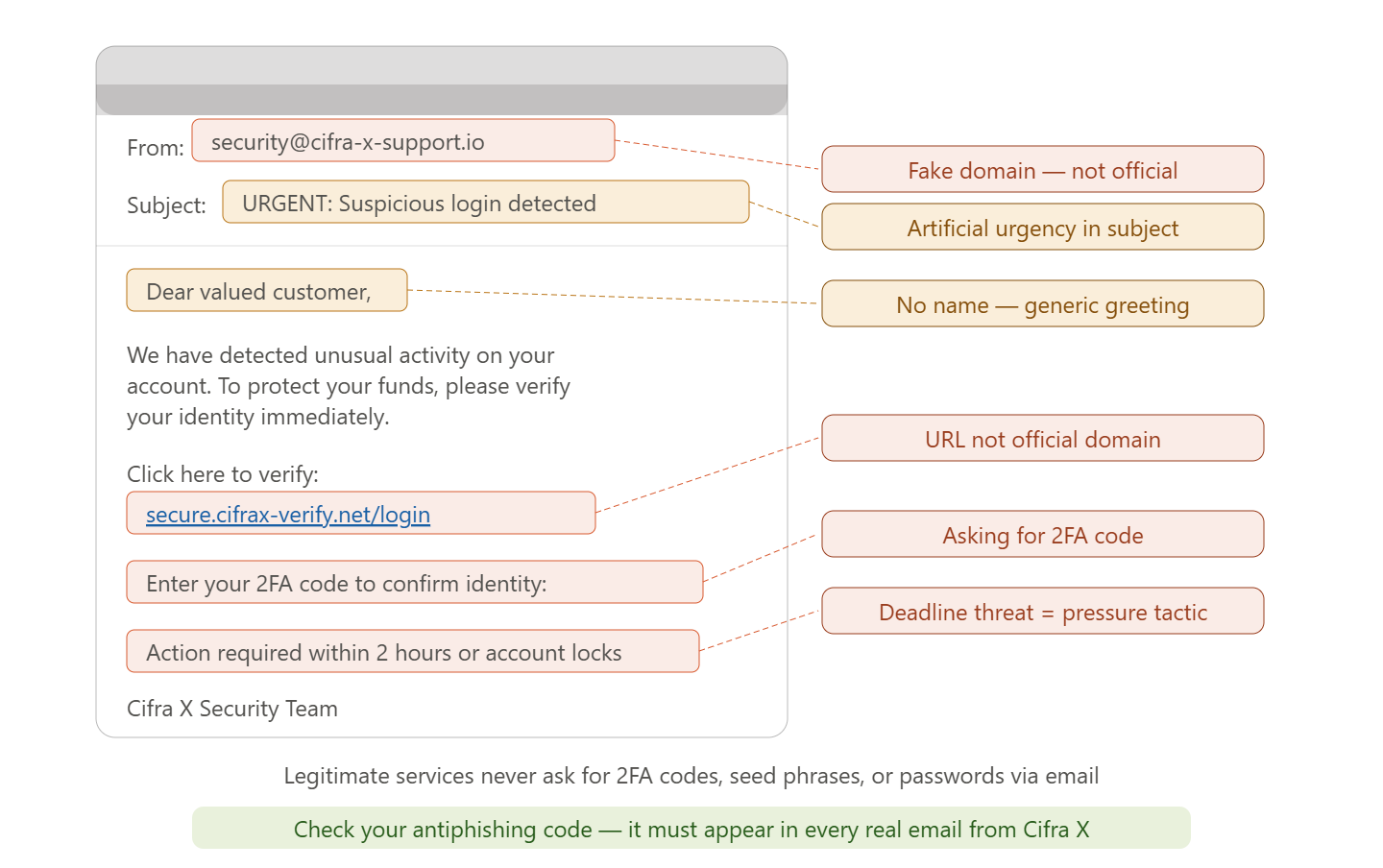
Analysis of a Typical Phishing Email
| Element | What Is Wrong |
|---|---|
| Sender address | [email protected] — not an official domain |
| Email subject | "URGENT: Suspicious Login" — artificial panic creation |
| Greeting | "Dear customer" — no name used, even though the exchange knows it |
| Link in the email | Hovering shows login.cifra-x-security.io |
| Request | Enter login, password, and 2FA code "for verification" |
| Deadline | "Within 2 hours, otherwise your account will be blocked" |
| Signature | "Security Department" without specific names or contact details |
Protection Bypass Techniques
Modern phishing attacks are becoming increasingly sophisticated:
Reverse Proxy Phishing
The attacker creates a transparent proxy between the victim and the real website. The victim sees the actual content of the legitimate website — but all data, including 2FA codes, is intercepted by the proxy in real time and immediately used to access the account.
This makes even TOTP codes ineffective — the attacker can use the intercepted code within its 30-second validity period. The only reliable protection is a hardware security key (YubiKey) bound to the specific domain.
Deepfake Phishing
The use of synthesized voices or videos of well-known people to create convincing "announcements" about giveaways and investment opportunities.
Compromise of Legitimate Websites
Instead of creating a clone, the attacker injects a malicious script into a real but poorly secured website. The user sees a correct URL and valid security certificate.
How to Protect Yourself Against Phishing
Technical Measures
Hardware security key — the only absolute protection against phishing attacks involving session interception. YubiKey is tied to a specific domain and physically cannot be used on another website.
Password manager — automatically fills credentials only on the correct domain. If you are on a phishing website, the password manager will not offer autofill — this is a warning sign.
Security browser extensions: MetaMask with built-in warnings, Wallet Guard, ScamSniffer.
Behavioral Measures
- Save all crypto-related websites you use as bookmarks — never search for them through search engines
- Check sender addresses in emails character by character, not only the displayed name
- Do not follow links from emails — enter the address manually or use a bookmark
- Hover over links before clicking and check the actual URL in the browser address bar
- Never enter your seed phrase in a browser — on any website
- If you have the slightest doubt about a website's authenticity — close the tab
Email Verification Checklist
- Does the sender domain match the official domain?
- Does the email contain my anti-phishing code?
- Does the greeting contain my name?
- Does the link lead to the official domain when hovered over?
- Does the email avoid creating artificial urgency?
- Does the email avoid requesting passwords, 2FA codes, or seed phrases?
What to Do If You Become a Phishing Victim
Immediate Actions (The First Minutes Are Critical)
- Change your Cifra X password immediately — if the attacker has not changed it yet
- Revoke active sessions — log out from all devices through security settings
- Disable withdrawals — through account settings or support
- Contact Cifra X Support — through the official website, not through links from the email
- Move funds from a non-custodial wallet to a new address — if a hot wallet has been compromised
If You Entered Your Seed Phrase
🚨 Seed Phrase Compromised — Act Immediately
Create a new wallet and immediately transfer all funds to the new address. A compromised wallet must be considered completely lost — an attacker can withdraw all funds at any time. A seed phrase that has been exposed cannot be "reset" or secured again.
After the Incident
- Report the phishing website to Google (through the Safe Browsing reporting form) and your browser provider
- Add the attacker's address to Chainabuse.com
- Warn the community — in the project's official chats