How to Protect Your Exchange Account
An exchange account is one of the most attractive targets for attackers in the cryptocurrency industry. Unlike credit card theft, where a bank may be able to reverse a transaction, cryptocurrency withdrawals from an exchange are irreversible. Once funds leave the account, recovering them is practically impossible.
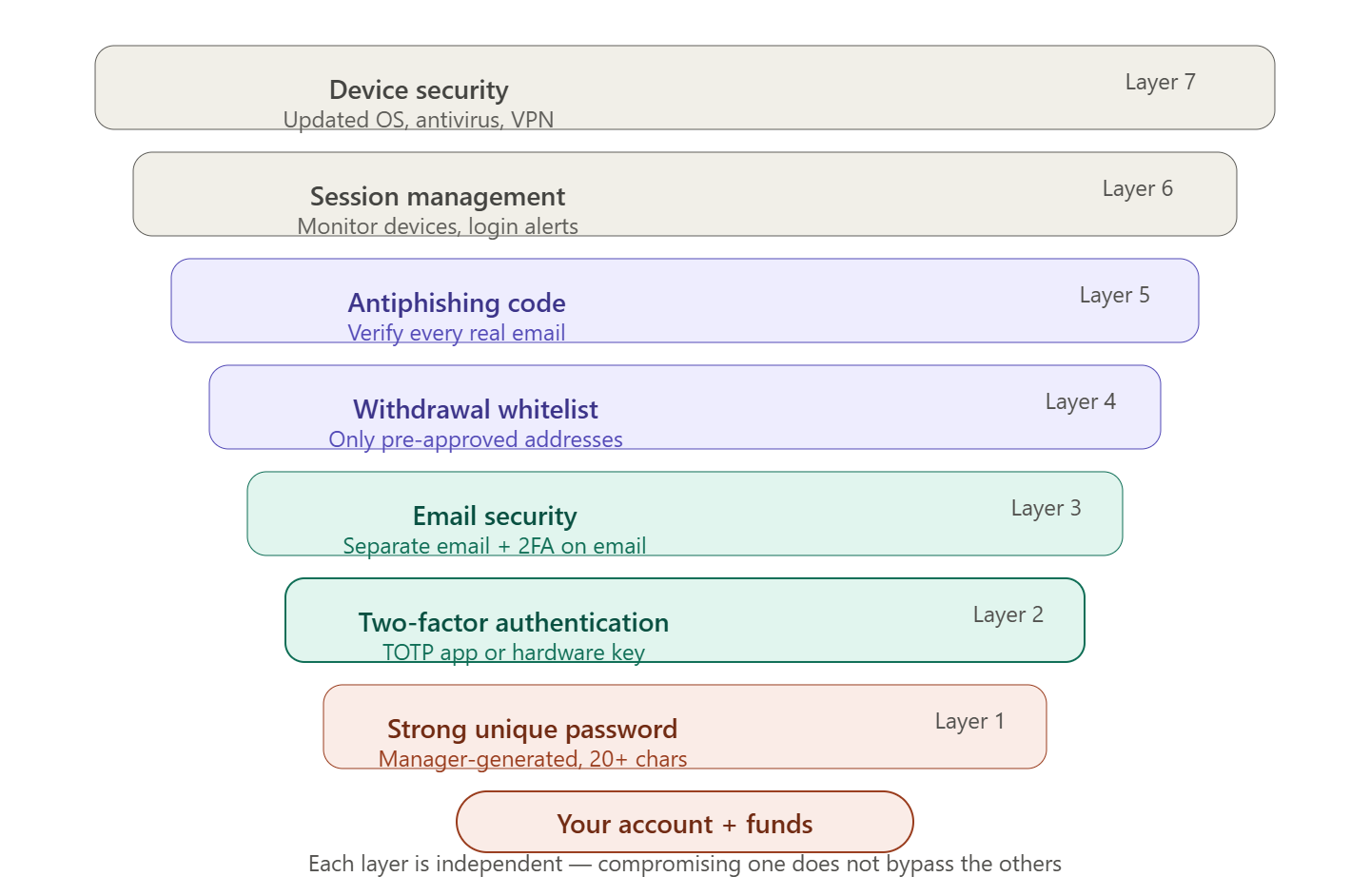
Comprehensive account protection is built on several independent security layers. Compromising one layer should not provide access to all funds — this is the core principle of defense-in-depth security.
Level 1: Password
A password is the first and most obvious line of defense. Despite this, weak and reused passwords remain one of the most common causes of account compromises.
Requirements for a Strong Password
| Criteria | Recommendation |
|---|---|
| Length | Minimum 16 characters, ideally 20+ |
| Complexity | Uppercase/lowercase letters, numbers, special characters |
| Uniqueness | Used only for Cifra X — not reused anywhere else |
| Unpredictability | Does not contain names, dates, or dictionary words |
| Storage | Only stored in a password manager |
Password Manager: An Essential Tool
Remembering unique complex passwords for dozens of services is impossible — and unnecessary. A password manager generates and stores cryptographically random passwords, requiring you to remember only one master password.
| Manager | Platform | Features |
|---|---|---|
| Bitwarden | All platforms | Open source, free |
| 1Password | All platforms | Convenient UX, family plans |
| KeePassXC | Desktop | Local storage, maximum control |
| Dashlane | All platforms | Built-in VPN, breach monitoring |
💡 Master Password
The master password for your password manager is the only password you need to remember. Make it long (20+ characters) and memorable: for example, four random words with a number and symbol. Never store it digitally.
What to Do If Your Password Is Leaked
Regularly check whether your email address has appeared in leaked databases through haveibeenpwned.com. If a leak is detected:
- Immediately change your Cifra X password
- Change your email account password
- Check login history for suspicious activity
Level 2: Two-Factor Authentication (2FA)
2FA is one of the most important account security elements. Even if an attacker obtains your password, they cannot access your account without the second factor.
Recommended Methods (Best to Worst)
Hardware security key (YubiKey, Google Titan) — maximum protection. It is bound to the website domain and will not work on a phishing website, even if it visually looks identical to the original.
TOTP application (Google Authenticator, Authy, Aegis) — a reliable basic option. One-time codes are generated offline every 30 seconds.
SMS codes — avoid. Vulnerable to SIM-swap attacks.
⚠️ Never Share Your 2FA Code
A code from an authenticator app is valid for 30 seconds and is intended only for entering on the exchange website. Cifra X support employees will never ask you for this code — such a request is always a scam.
Level 3: Email Account Protection
Email is a key attack vector because password reset links are sent through it. If your email is compromised, your exchange account is also at risk.
Email Requirements for Exchange Accounts
- Use a separate email address created exclusively for cryptocurrency accounts
- Enable 2FA on the email account itself (Gmail and Proton Mail support hardware security keys)
- Use a reputable provider with strong security practices (Proton Mail, Gmail)
- Do not publish this email address publicly — on social networks, forums, or Telegram
ℹ️ Proton Mail
Proton Mail is a Swiss email provider with end-to-end encryption and a strong privacy policy. It is a popular choice for cryptocurrency accounts.
Level 4: Withdrawal Address Whitelist
A whitelist is a feature that restricts withdrawals to pre-approved wallet addresses. Even if an attacker gains full access to your account, they cannot withdraw funds to their own address.
💡 Key Advantage
A withdrawal whitelist is the only protection that remains effective even if your login, password, and 2FA are fully compromised. An attacker cannot add their own address without access to your email (which they do not control) and passing a withdrawal lock period.
Level 5: Anti-Phishing Code
An anti-phishing code is a unique text identifier that you set yourself. All official emails will contain this code.
An email without your code is definitely fake, even if it looks identical to a legitimate message.
Level 6: Session and Device Management
Monitoring Active Sessions
The Security → Active Sessions section displays all devices authorized in your account: IP addresses, browsers, and last activity times.
Regularly review this list. If you find an unknown session:
- Immediately terminate all active sessions
- Change your password
- Check transaction history
Login Notifications
Enable email notifications for every new login attempt. This allows you to detect unauthorized access immediately.
Level 7: Device Security
An exchange account is only as secure as the device used to access it.
Device Requirements
- Updated operating system and browser — most attacks exploit known vulnerabilities in outdated software
- Antivirus software — especially important on Windows; risk is lower but not zero on macOS and Linux
- Minimal browser extensions — every extension can access webpage content, including login forms
- Separate browser profile for exchange activities — isolates extensions and cookies
⚠️ Public Networks
Never access your exchange account through public Wi-Fi (cafes, airports, hotels). If necessary, use a VPN from a trusted provider (Mullvad, ProtonVPN).
Mobile Device Protection
- Enable device encryption (enabled by default on modern smartphones)
- Use biometrics or a strong PIN (not a 4-digit code)
- Do not install APK files from unofficial sources on Android
- Regularly update the Cifra X app only from official app stores
Comprehensive Security Scheme
Checklist: What to Do Right Now
Critical (5 Minutes)
- Enable 2FA using an authenticator app (not SMS)
- Set a unique strong password that is not used anywhere else
- Protect your account email with a separate password and 2FA
Important (15 Minutes)
- Enable email login notifications
- Review active sessions — remove any unfamiliar ones
Additional (Advanced Level)
- Create a separate browser profile for exchange activities
- Do not use your account email publicly anywhere
- Set up email monitoring through haveibeenpwned.com
What to Do If You Suspect a Hack
🚨 Immediate Actions After Suspected Compromise
Act quickly — every minute matters.
- Terminate all active sessions — "Security" → "Terminate all sessions"
- Change your password immediately
- Disable and reconfigure 2FA — if you suspect your device has been compromised
- Disable withdrawals — through customer support
- Contact Cifra X Support — through the official website, not through links from emails
- Check your email account — make sure there are no unauthorized changes
- Review transaction history — record any unauthorized operations
💡 Useful Advice
Account security is a process, not a one-time action. Review this checklist every few months: check active sessions, make sure 2FA is working, and monitor your email for leaks. Most account compromises happen not because protection is absent, but because it becomes outdated or was configured incorrectly.