Types of Cryptocurrency Wallets: Hot, Cold, and Custodial
A cryptocurrency wallet is a tool for storing cryptographic keys and interacting with the blockchain. Despite its name, a wallet does not store the coins themselves — they always remain on the blockchain. A wallet stores the private key, which provides the ability to manage funds associated with a specific address.
Choosing a wallet type means choosing between convenience and security, between control and responsibility. There is no universally "best" wallet: the optimal choice depends on the amount of assets, frequency of use, and level of technical expertise.
The Main Distinction: Custodial vs Non-Custodial
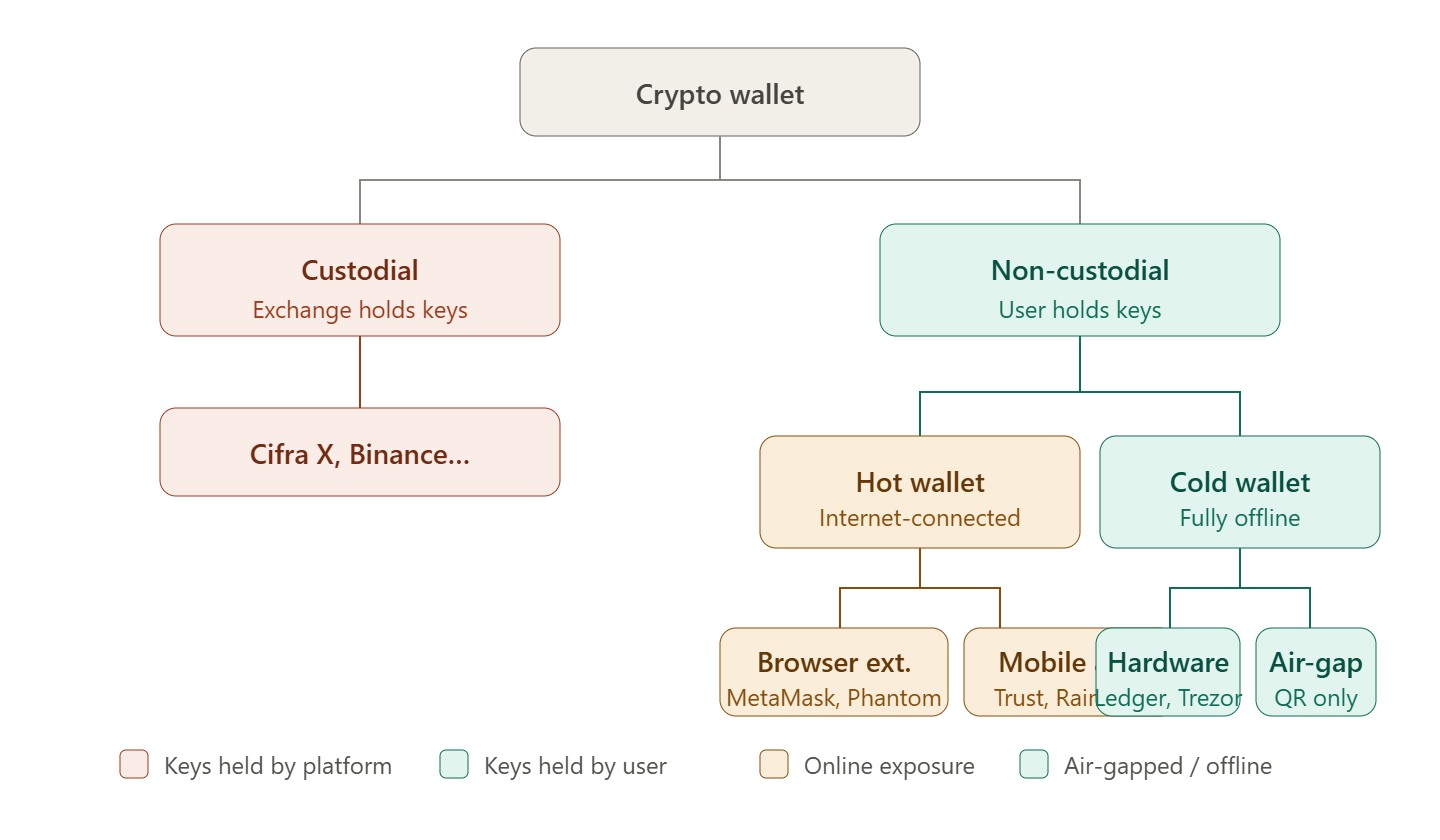
Before discussing hot and cold wallets, it is important to understand the fundamental distinction based on who controls the keys.
| Type | Who Stores the Keys | Analogy |
|---|---|---|
| Custodial | A third party (exchange, service provider) | Money in a bank account |
| Non-custodial | The user themselves | Cash stored in a personal safe |
"Not your keys — not your coins" — if you do not control the private key, you are not the true owner of the assets.
Custodial Wallets
A custodial wallet is an account on an exchange or service where the private keys are stored by the platform itself. The user can see the balance and manage funds through the interface, but technically the platform controls the keys.
How It Works
When registering on Cifra X and depositing funds, assets are credited to addresses controlled by the exchange. The user manages the balance through the interface, while the exchange executes transactions on their behalf.
Advantages
- Simplicity — no need to understand keys, seed phrases, or blockchain networks
- Account recovery — if you lose your password, support can help restore access
- Ready for trading — funds are immediately available for buying, selling, and exchanging
- Additional services — staking, earn products, margin trading
- Protection against user mistakes — it is impossible to accidentally lose a seed phrase
Risks
- Platform risk — exchange bankruptcy or hacking may result in loss of funds (Mt. Gox, FTX)
- Account restrictions — regulatory requirements, verification procedures, or technical issues
- No direct blockchain access — cannot interact with DeFi protocols directly
- Censorship — the platform may restrict certain operations
When to Use
A custodial wallet is optimal for active trading, smaller amounts, and beginners who are just starting to explore cryptocurrencies.
ℹ️ Security on Cifra X
Cifra X stores most user funds in cold storage, uses a multi-layer security system, and supports two-factor authentication. However, for large long-term holdings, self-custody is recommended.
Non-Custodial Wallets
With non-custodial storage, the user has full control over private keys. No third party has access to the funds — and no one can help recover them if they are lost.
Non-custodial wallets are divided into hot and cold wallets based on whether they are connected to the internet.
Hot Wallets
A hot wallet is a non-custodial wallet that is constantly connected to the internet. It provides maximum convenience for daily operations and interaction with DeFi applications.
Browser Extensions
The most common type of hot wallet. Installed as a browser extension and allows direct interaction with web applications.
| Wallet | Networks | Features |
|---|---|---|
| MetaMask | Ethereum, EVM networks | DeFi industry standard |
| Rabby | EVM networks | Transaction preview, security analysis |
| Phantom | Solana, Ethereum, Bitcoin | Multi-chain, NFT support |
| Keplr | Cosmos ecosystem | Staking, IBC transfers |
| Tonkeeper | TON | TON ecosystem, Telegram integration |
Mobile Wallets
Smartphone applications. Convenient for everyday payments and storing small amounts.
| Wallet | Platform | Networks |
|---|---|---|
| Trust Wallet | iOS, Android | Multi-chain |
| Rainbow | iOS, Android | Ethereum, L2 networks |
| Exodus | iOS, Android, Desktop | Multi-chain |
| BlueWallet | iOS, Android | Bitcoin, Lightning |
Desktop Wallets
Installed on a computer. Provide more features than mobile wallets but are vulnerable to malware.
Examples: Electrum (Bitcoin), Exodus (multi-chain), Sparrow Wallet (Bitcoin, advanced)
Advantages of Hot Wallets
- Instant access to funds 24/7
- Interaction with DeFi, dApps, and NFT marketplaces
- Free — no hardware purchase required
- Simple setup and usage
Risks of Hot Wallets
⚠️ Hot Wallet Limitation
Constant internet connection makes hot wallets vulnerable to viruses, malicious browser extensions, phishing websites, and harmful smart contracts. Do not store amounts in a hot wallet that you cannot afford to lose.
- Malware — viruses can steal private keys
- Phishing — fake websites imitating DeFi protocols
- Malicious smart contracts — signing a harmful transaction
- Device compromise — hacking of a phone or computer
Hot Wallet Security Recommendations
- Install wallets only from official sources
- Do not store large amounts — hot wallets are for "operational" funds
- Verify contract addresses before signing transactions
- Use a separate browser or profile for DeFi activities
- Regularly review and revoke unused approvals
Cold Wallets
A cold wallet stores private keys in an environment isolated from the internet. This makes it highly resistant to online attacks — keys never leave the protected environment.
Hardware Wallets
Physical devices specifically designed for secure private key storage. When signing transactions, the key remains inside the device — only the signed transaction leaves it.
How It Works:
- The transaction is created in an application on a computer
- It is transferred to the device via USB or Bluetooth
- The user checks transaction details on the device's own screen
- The user confirms by pressing a physical button
- The signed transaction is sent to the network — the key remains inside
| Device | Manufacturer | Price | Features |
|---|---|---|---|
| Ledger Nano S Plus | Ledger (France) | ~$79 | Compact, wide asset support |
| Ledger Nano X | Ledger (France) | ~$149 | Bluetooth, mobile app support |
| Trezor Model One | SatoshiLabs (Czech Republic) | ~$59 | Open-source, basic model |
| Trezor Safe 5 | SatoshiLabs (Czech Republic) | ~$169 | Touchscreen, latest model |
| Coldcard Mk4 | Coinkite (Canada) | ~$150 | Maximum security, Bitcoin only |
| BitBox02 | Shift Crypto (Switzerland) | ~$149 | Compact, open-source |
💡 Useful Advice
Buy a hardware wallet only directly from the manufacturer or through officially authorized resellers. Second-hand devices or those purchased from marketplaces (eBay, Avito) may be compromised. Never use a device that already contains a seed phrase when you first turn it on.
Air-Gap Wallets
Devices that have never connected to the internet or a computer via USB. Data transfer is performed through QR codes or a microSD card, eliminating network attack possibilities.
| Device | Transfer Method | Features |
|---|---|---|
| Keystone Pro | QR codes | Camera scanning, touchscreen |
| Passport | QR codes / microSD | Bitcoin only, open-source |
| Coldcard Mk4 | microSD / NFC | Air-gap mode, advanced features |
Paper Wallet
A private key and public address printed on paper or written down manually. Historically the first type of cold storage — today it has been almost completely replaced by hardware wallets.
Disadvantages: vulnerable to physical destruction (fire, water), difficult to use safely for transactions, risk of key entry errors.
Advantages of Cold Wallets
- Maximum protection against online attacks — the key never connects to the internet
- Full control over assets — independence from third parties
- Physical confirmation — transactions cannot be signed without pressing a button on the device
- Long-term reliability — no dependence on service providers or platforms
Risks of Cold Wallets
- Physical loss — loss or damage of the device (resolved with the seed phrase)
- Physical theft — a device without a PIN does not provide access, but the risk remains
- Complexity of use — requires technical understanding
- Cost — devices typically cost $60–170
- False sense of security — a device does not protect against seed phrase compromise
Seed Phrase: Universal Backup Key
Regardless of the type of non-custodial wallet, a seed phrase is generated during setup — a sequence of 12 or 24 words. It is the master key from which all wallet private keys are mathematically derived.
🚨 Seed Phrase Storage Rules
- Write it down on paper — never store it digitally
- Make at least two copies and keep them in different locations
- Consider using metal plates for long-term storage
- Never enter it on websites or apps except the official wallet during recovery
- Whoever owns the seed phrase owns all associated funds
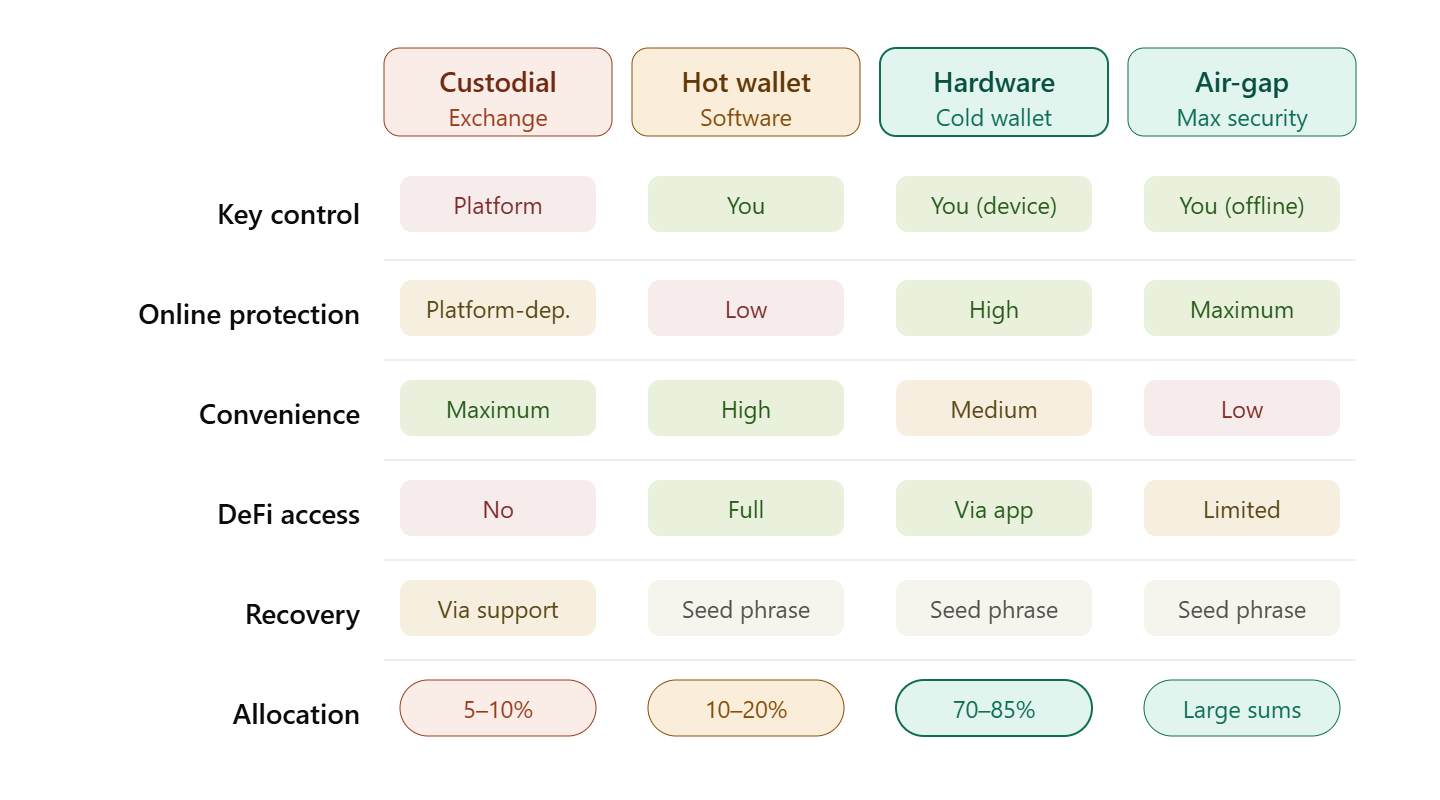
Comparison Table of All Wallet Types
| Parameter | Custodial | Hot | Hardware | Air-Gap |
|---|---|---|---|---|
| Key Control | Platform | User | User | User |
| Protection Against Online Attacks | Depends on exchange | Low | High | Maximum |
| Convenience | Maximum | High | Medium | Low |
| Recovery After Loss | Through support | Through seed phrase | Through seed phrase | Through seed phrase |
| DeFi Interaction | No | Yes | Yes (through apps) | Limited |
| Cost | Free | Free | $60–170 | $100–200 |
| Best For | Traders, beginners | Active DeFi users | Long-term holders | Maximum security |
| Recommended Allocation | Up to 10% of portfolio | Up to 20% of portfolio | 70–85% of portfolio | Large holdings |
Multisignature (Multisig)
A multisignature wallet requires multiple private keys to approve a transaction. The most common schemes are 2-of-3 (any 2 out of 3 keys are required) or 3-of-5.
Advantages:
- Compromise of a single key does not provide access to funds
- Protection against a single point of failure
- Ideal for corporate storage and large personal holdings
Examples of implementation: Gnosis Safe (EVM), Bitcoin native multisig, Sparrow Wallet (Bitcoin multisig).
Multi-Level Storage Strategy
A professional approach is to distribute assets across multiple storage types depending on their purpose and amount.
| Level | Wallet Type | Allocation | Purpose |
|---|---|---|---|
| Hot | Exchange (Cifra X) | 5–10% | Active trading |
| Warm | Hot non-custodial wallet | 10–20% | DeFi, occasional operations |
| Cold | Hardware wallet | 70–85% | Long-term storage |
💡 Useful Advice
Start small: create a hot wallet (MetaMask or Phantom), transfer a small amount, and practice making transactions. Once you feel confident, purchase a hardware wallet and move the majority of your assets to cold storage. Practicing with small amounts helps avoid costly mistakes when managing larger funds.