How to Store Cryptocurrency Securely
Secure cryptocurrency storage is one of the most important skills for anyone participating in the crypto market. Unlike the traditional banking system, where stolen funds or compromised accounts may be recoverable through security procedures, lost cryptocurrency assets are generally impossible to recover. The responsibility for protecting your funds rests entirely with you.
Understanding the different storage methods, along with their advantages and risks, allows you to build a security strategy that matches your technical knowledge, the size of your holdings, and your intended use cases.
The Fundamental Principle: Keys = Ownership
Cryptocurrency security is based on one simple rule:
"Not your keys — not your coins." If you do not control the private keys, you are not the true owner of the assets.
A private key is a cryptographic secret that gives you the authority to control funds associated with a specific blockchain address. A seed phrase is a sequence of 12 or 24 words from which the entire wallet, including all of its private keys, can be mathematically restored.
Whoever possesses the seed phrase controls all funds associated with that wallet—permanently and without exception.
Types of Cryptocurrency Storage
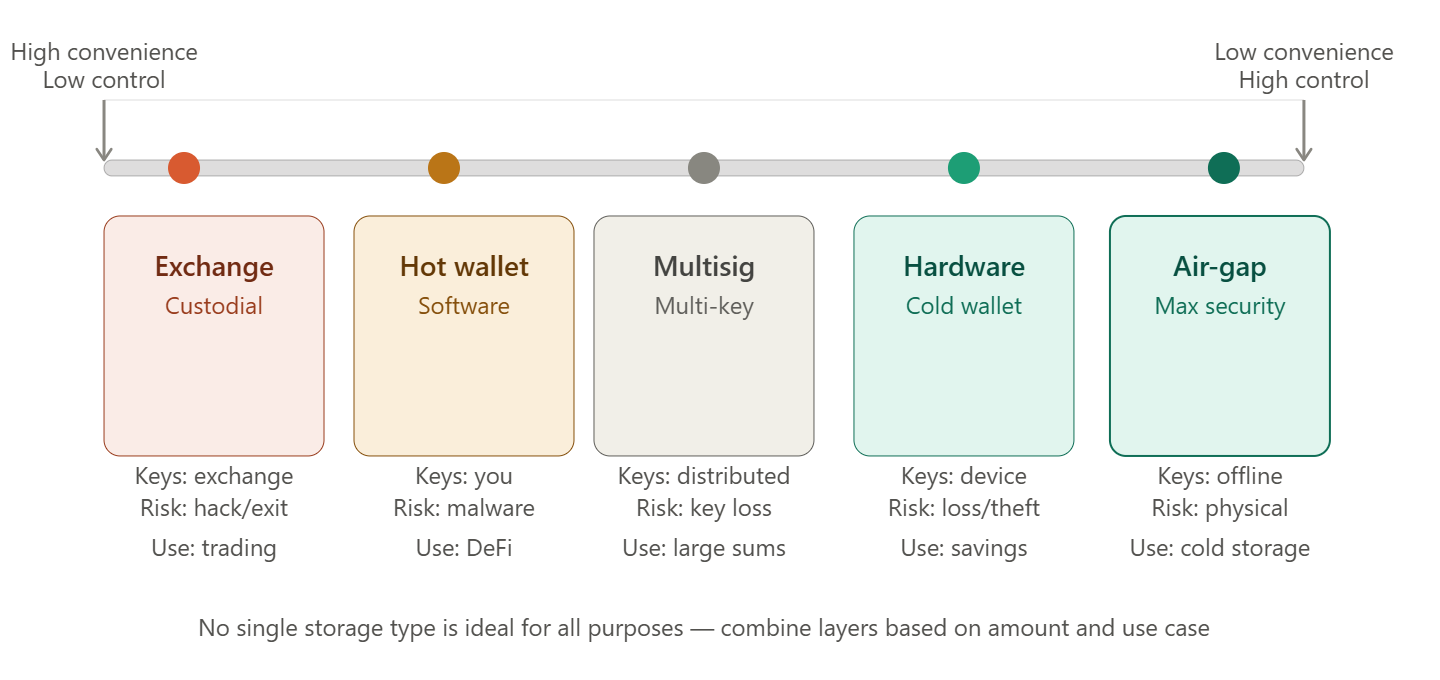
All cryptocurrency storage methods fall into two main categories based on who controls the private keys:
| Type | Key Control | Examples |
|---|---|---|
| Custodial | Held by a third party (exchange or service provider) | Cifra X, Binance, Coinbase |
| Non-custodial (Self-Custody) | Controlled by the owner | Hardware, software, and paper wallets |
Custodial Storage: Exchanges and Service Providers
When you store cryptocurrency on an exchange, you do not technically hold the coins themselves. Instead, you hold a claim against the exchange, which manages the actual private keys on your behalf.
When Custodial Storage Makes Sense
- Active trading, where funds need to be immediately available.
- Small amounts that you can afford to lose in the event of unforeseen circumstances.
- If you do not yet have the technical knowledge required for secure self-custody.
- Using exchange services such as staking, Earn, or margin trading.
Risks of Custodial Storage
⚠️ Risks of Storing Assets on an Exchange
The cryptocurrency industry has seen numerous exchange hacks and bankruptcies, including Mt. Gox (2014, $450 million), Bitfinex (2016, $72 million), and FTX (2022, $8 billion). If an exchange becomes insolvent, users become creditors and may not recover their funds.
- Exchange hacks — funds are stored centrally, making exchanges attractive targets for attackers.
- Bankruptcy or fraud — the collapse of FTX demonstrated that even major exchanges can fail.
- Account suspension — technical issues, regulatory requirements, or identity verification may temporarily restrict access.
- No control over private keys — you cannot independently verify ownership of your assets on the blockchain.
How to Improve Security on an Exchange
- Enable Two-Factor Authentication (2FA)—preferably using a hardware security key (such as YubiKey) or an authenticator app (Google Authenticator, Authy) instead of SMS.
- Use a strong, unique password stored in a password manager.
- Enable a withdrawal address whitelist so withdrawals are only possible to pre-approved wallet addresses.
- Activate an anti-phishing code to verify the authenticity of exchange emails.
- Enable login and transaction notifications.
Non-Custodial Storage (Self-Custody)
With self-custody, you are the sole owner of your private keys. No third party can freeze or confiscate your assets—but no one can recover them if you lose your keys.
Hot Wallets
Hot wallets are software wallets connected to the internet. They are convenient for everyday use and interacting with DeFi applications, but they are more vulnerable to online attacks.
| Wallet | Platform | Supported Networks |
|---|---|---|
| MetaMask | Browser, Mobile | Ethereum and EVM-compatible networks |
| Phantom | Browser, Mobile | Solana, Ethereum, Bitcoin |
| Trust Wallet | Mobile | Multi-chain |
| Rabby | Browser | EVM-compatible networks |
| Tonkeeper | Mobile | TON |
Typical use case: Small balances for active DeFi usage, frequent transactions, and interaction with decentralized applications (dApps).
⚠️ Hot Wallet Limitation
A hot wallet installed on an internet-connected device is potentially vulnerable to malware, malicious browser extensions, and phishing attacks. Never store amounts that you cannot afford to lose in a hot wallet.
Cold Wallets: Hardware Wallets
Hardware wallets are physical devices that store private keys in an isolated offline environment. Transactions are signed inside the device, and the private key never leaves it.
| Device | Manufacturer | Features |
|---|---|---|
| Ledger Nano X / S Plus | Ledger (France) | Broad asset support, Bluetooth on Nano X |
| Trezor Model T / Safe | SatoshiLabs (Czech Republic) | Open-source firmware, touchscreen |
| Coldcard Mk4 | Coinkite (Canada) | Maximum security, Bitcoin only |
| BitBox02 | Shift Crypto (Switzerland) | Compact design, open-source |
| Keystone Pro | Keystone | Air-gapped, QR-code transactions instead of USB |
Typical use case: Long-term storage of significant cryptocurrency holdings.
💡 Helpful Tip
Purchase a hardware wallet only from the official manufacturer or an authorized reseller. Used devices or those purchased from unofficial marketplaces may be compromised. Never use a hardware wallet that already contains a pre-generated seed phrase.
Cold Wallets: Paper Wallets
Paper wallets consist of a private key and wallet address written or printed on paper. They are completely offline but vulnerable to physical damage (fire, water) and theft. As of 2024, they have largely been replaced by hardware wallets.
Air-Gapped Wallets
Air-gapped wallets are devices that have never been physically connected to the internet. Transactions are transferred using QR codes or SD cards, providing the highest level of protection against online attacks when used correctly.
Protecting Your Seed Phrase
Your seed phrase is the most vulnerable component of your storage setup. If it is compromised, all associated funds can be stolen immediately and permanently.
Seed Phrase Storage Rules
🚨 Critical
- Never photograph your seed phrase or store it digitally (phone, computer, cloud storage, messaging apps, or email).
- Never enter your seed phrase on websites or in applications, except when restoring your wallet through the official wallet software.
- Never share your seed phrase with anyone—not with "support agents," "verification teams," or "technical specialists."
Physical Seed Phrase Storage:
- Write it down on paper (at least two copies) and store them in separate secure physical locations.
- Consider using metal backup plates (such as Cryptosteel or Bilodal) that are resistant to fire and water.
- Store the backup in a safe or a bank safety deposit box.
- Consider using Shamir's Secret Sharing, which splits the seed phrase into multiple parts, each of which is useless on its own.
Multisignature (Multisig)
Multisig is a technology that requires multiple private keys (for example, 2-of-3 or 3-of-5) to authorize a transaction. It is widely used for corporate treasury management and securing large personal cryptocurrency holdings.
Advantage: Compromising a single private key does not grant an attacker access to the funds.
Examples: Gnosis Safe (EVM networks), native Bitcoin multisig.
Multi-Layer Storage Strategy
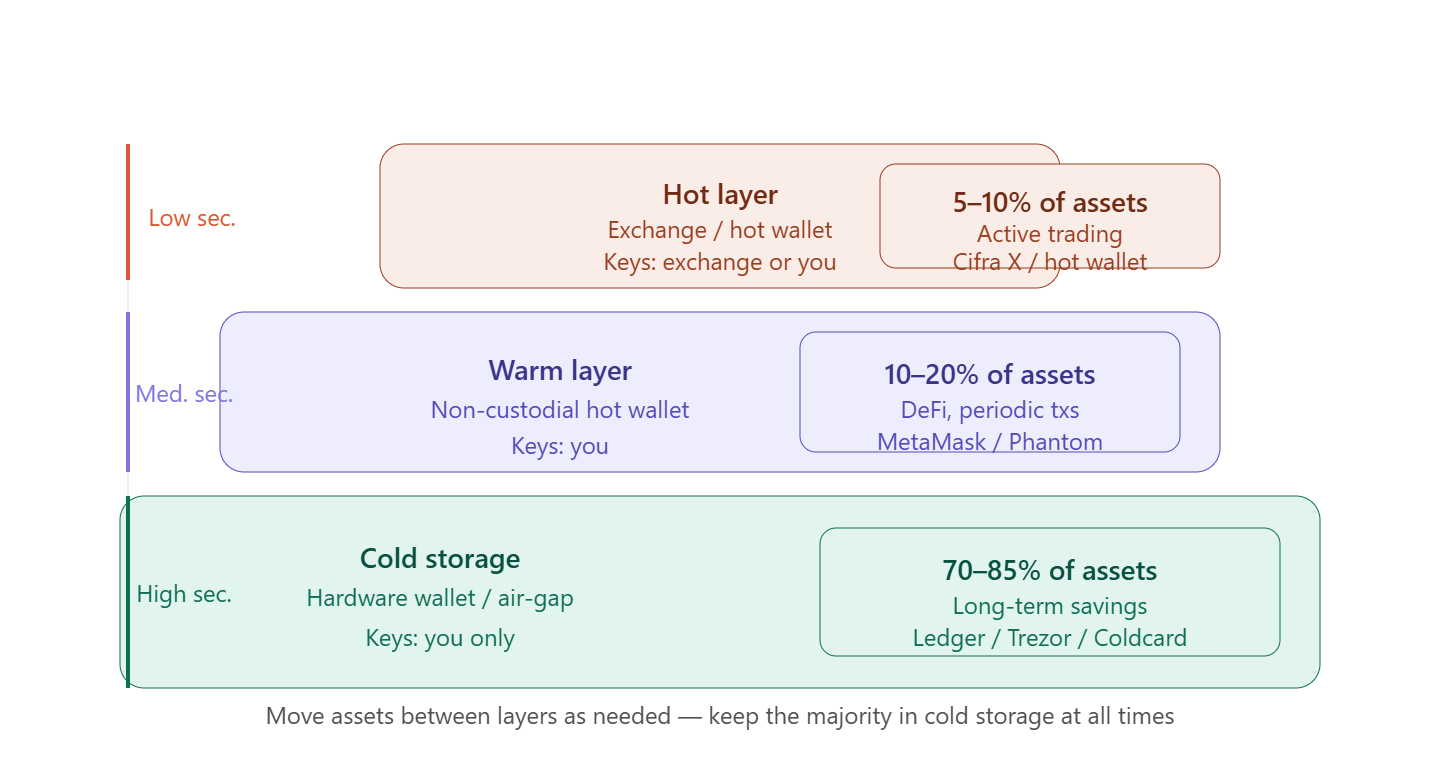
A professional approach is to divide assets across different security levels based on their intended purpose.
| Tier | Storage Type | Allocation | Purpose |
|---|---|---|---|
| Hot | Exchange / Hot Wallet | 5–10% | Active trading and everyday transactions |
| Warm | Non-custodial Hot Wallet | 10–20% | DeFi and occasional transactions |
| Cold | Hardware Wallet | 70–85% | Long-term storage and savings |
Operational Security (OpSec)
The technical security of your wallet is only one part of protecting your assets. Operational security is equally important.
Device Security
- Use a dedicated device (laptop or smartphone) exclusively for managing significant cryptocurrency holdings.
- Keep your operating system and software up to date.
- Do not install software from untrusted sources.
- Use a reputable antivirus solution on devices that host hot wallets.
- Avoid using public Wi-Fi networks for cryptocurrency transactions.
Browser Security
- Minimize the number of browser extensions you install—every extension represents a potential security risk.
- Install wallet extensions only from official extension stores.
- Always verify website URLs—phishing websites often imitate legitimate exchanges with only minor differences in the domain name.
- Use bookmarks for frequently visited cryptocurrency websites instead of relying on search engines.
Verifying Wallet Addresses
⚠️ Clipboard Hijacking
Some malware replaces a copied wallet address with an attacker's address while it is in your clipboard. Always verify the first and last several characters of the wallet address after pasting it. For large transfers, verify the entire address before confirming the transaction.
Phishing and Social Engineering
Most major cryptocurrency thefts occur not because of technical vulnerabilities, but because attackers exploit human error.
- Phishing websites — convincing copies of legitimate exchanges that use slightly altered domain names.
- Fake support agents — scammers on Telegram or Discord pretending to represent an exchange.
- Fake airdrops — "free token" offers that require you to connect your wallet.
- Malicious smart contracts — signing a fraudulent transaction that grants an attacker access to your assets.
- SIM swapping — intercepting SMS verification codes by fraudulently transferring your phone number to another SIM card.
Inheritance and Access Planning
One of the unique challenges of self-custody is that if the wallet owner dies or becomes incapacitated, the assets may become permanently inaccessible unless an access plan has been prepared.
Basic Recommendations
- Prepare sealed instructions for a trusted person describing your assets and how to access them (without revealing the private keys themselves).
- Consider legal planning, such as including cryptocurrency assets in your will together with instructions for access.
- Use multisignature (multisig) wallets with keys distributed among trusted individuals.
- For substantial holdings, consider professional crypto custody services that provide institutional-grade asset protection.
Secure Storage Checklist
Exchange (Custodial Storage):
- Use a strong, unique password stored in a password manager.
- Enable app-based 2FA (not SMS).
- Enable a withdrawal address whitelist.
- Configure an anti-phishing code.
- Enable email notifications for logins and transactions.
Self-Custody:
- Write down your seed phrase by hand (at least two copies) and store them securely.
- Ensure your seed phrase has never been stored digitally.
- Purchase your hardware wallet directly from the official manufacturer or an authorized reseller.
- Verify the wallet from scratch (factory reset and recovery using the seed phrase).
- Consider a multisig setup for large cryptocurrency holdings.
Operational Security:
- Verify every wallet address before sending funds.
- Ensure browser extensions have access to your wallet only when absolutely necessary.
- Do not use devices dedicated to large cryptocurrency transactions for everyday browsing or entertainment.
💡 Helpful Tip
Start with the basics: enable Two-Factor Authentication (2FA) on all of your exchange accounts today. It takes only a few minutes and significantly reduces the risk of unauthorized account access. A hardware wallet is the next logical step as your cryptocurrency holdings grow.