What Is Two-Factor Authentication (2FA)
Two-Factor Authentication (2FA, Two-Factor Authentication) is an identity verification method that requires not only a password but also a second independent authentication factor to access an account. Even if an attacker obtains your password, they cannot access your account without the second factor.
The name reflects the core principle: instead of a single "lock" (password), two are used. Compromising one does not open the door. According to Google, enabling 2FA blocks 99.9% of automated account attacks.
Authentication Factors
In information security, authentication factors are divided into three categories:
| Category | Principle | Examples |
|---|---|---|
| Something you know | Secret information | Password, PIN code, security question |
| Something you have | Physical object | Phone, hardware security key, token |
| Something you are | Biometrics | Fingerprint, Face ID, retina scan |
2FA combines two different factors—most commonly "something you know" (password) + "something you have" (phone or hardware security key).
ℹ️ 2FA vs MFA
MFA (Multi-Factor Authentication) is a broader concept that includes two or more authentication factors. 2FA is a specific type of MFA that uses exactly two factors. In practice, these terms are often used interchangeably.
Types of 2FA: From Weakest to Strongest
Not all 2FA methods provide the same level of security. They are listed below from the least secure to the most secure.
SMS Codes (Least Secure)
A one-time code is sent via SMS to a linked phone number. Historically, this was the first widely adopted 2FA method.
Vulnerabilities:
- SIM swap attacks — an attacker convinces a mobile operator to transfer your phone number to their SIM card and receives your SMS messages.
- SS7 attacks — SMS interception through vulnerabilities in mobile network protocols.
- Social engineering — a fake "support representative" asks you to provide the verification code.
⚠️ SMS Codes Are Not Secure
In 2016, the NIST (National Institute of Standards and Technology) recommended moving away from SMS as a 2FA method due to SIM swap vulnerabilities. For cryptocurrency accounts, SMS-based 2FA should be avoided.
Email Codes
A one-time code is sent to a linked email address. This method is vulnerable if the email account itself is compromised—if your email is hacked, email-based 2FA becomes ineffective.
TOTP Applications (Recommended Basic Method)
TOTP (Time-based One-Time Password) is a method that generates one-time codes based on the current time and a shared secret key. The code changes every 30 seconds and is valid only during that period.
How it works:
- When enabling 2FA, the exchange displays a QR code containing a secret key.
- You scan the QR code using an authenticator application.
- The application generates a 6-digit TOTP code every 30 seconds.
- During login, you enter the current code, which matches the code calculated by the server.
Codes are generated offline—without internet access or SMS. They cannot be intercepted over the network.
Popular TOTP Applications:
| Application | Platform | Features |
|---|---|---|
| Google Authenticator | iOS, Android | Simple, reliable, no cloud backup by default |
| Authy | iOS, Android, Desktop | Encrypted cloud backup |
| 2FAS | iOS, Android | Open-source, backup support |
| Microsoft Authenticator | iOS, Android | Integration with Microsoft ecosystem |
| Aegis | Android | Open-source, local backups |
💡 Helpful Tip
When setting up TOTP, always save the backup key (secret key)—the long string of characters displayed next to the QR code. If you lose your phone without the backup key, access to your account may be permanently lost.
Hardware Security Keys (Most Secure)
Physical devices (USB or NFC) that verify identity using cryptographic authentication. The user simply presses a button on the device during login—no codes need to be entered.
Standards:
- FIDO2 / WebAuthn — modern security standard supported by most browsers.
- U2F — predecessor of FIDO2, still widely supported.
Popular Devices:
| Device | Interface | Features |
|---|---|---|
| YubiKey 5 Series | USB-A/C, NFC | Broad compatibility, industry standard |
| YubiKey Bio | USB-A/C | Biometric authentication (fingerprint) |
| Google Titan | USB-A/C, NFC | Developed by Google |
| SoloKeys | USB-A/C | Open-source hardware |
Why hardware keys are more secure than TOTP:
- Phishing-resistant — the key is tied to a specific website domain. Even if a phishing site looks identical to the real one, the security key will refuse to authenticate.
- Not vulnerable to code interception — there is no one-time code that can be stolen.
- Requires physical access — without the device itself, login is impossible.
How TOTP Works: Technical Principle
When scanning a QR code, the authenticator application receives a secret key (seed). Every time a verification code is requested, the following calculation is performed:
TOTP = HMAC-SHA1(secret_key, floor(current_time / 30))
The result is truncated to a 6-digit code. The server performs the same calculation—if the generated values match, the code is accepted.
Key properties:
- The code is valid for only 30 seconds.
- Knowing one code does not allow an attacker to calculate the next one.
- Codes are generated without a network connection.
Setting Up 2FA on Cifra X: Step-by-Step Guide
Activating TOTP
- Go to "Settings" → "Security".
- Click "Connect Google Authenticator".
- Open the Google Authenticator app and tap "+".
- Select "Scan QR code" and scan the code displayed on the screen.
- Save the backup key in a secure location (write it down on paper).
- Enter the 6-digit code generated by the app to confirm activation.
What 2FA Protects on Cifra X
| Action | Requires 2FA |
|---|---|
| Account login | Yes |
| Withdrawals | Yes |
| Password changes | Yes |
| Email changes | Yes |
| Disabling 2FA | Yes |
2FA Attacks and Protection Methods
Even with 2FA enabled, there are ways attackers may attempt to bypass it. Understanding these methods helps you protect your account.
Real-Time Phishing
An attacker creates a fake website that forwards your entered login credentials and TOTP code to the real website in real time, allowing them to access your account while the session is still valid.
Protection: Use a hardware security key (which is tied to the legitimate domain), verify website URLs before entering credentials, and use bookmarks instead of search results.
SIM Swap
An attacker transfers your phone number to their own SIM card and gains access to SMS verification codes.
Protection: Do not use SMS-based 2FA. Protect your SIM card with a PIN and request a SIM transfer lock from your mobile operator.
Malware on the Device
Malicious software can capture TOTP codes when they are displayed or intercept entered information.
Protection: Use antivirus software, a dedicated device for critical operations, and hardware security keys.
Social Engineering
Scammers contact users while pretending to be support representatives and ask for a 2FA code for "verification" or "account protection."
🚨 Cifra X Will Never Request Your 2FA Code
No Cifra X employee will ask you to provide a code from your authenticator application or SMS. Such a request is a sign of fraud. Stop communication immediately and contact support only through official channels.
Comparison of 2FA Methods
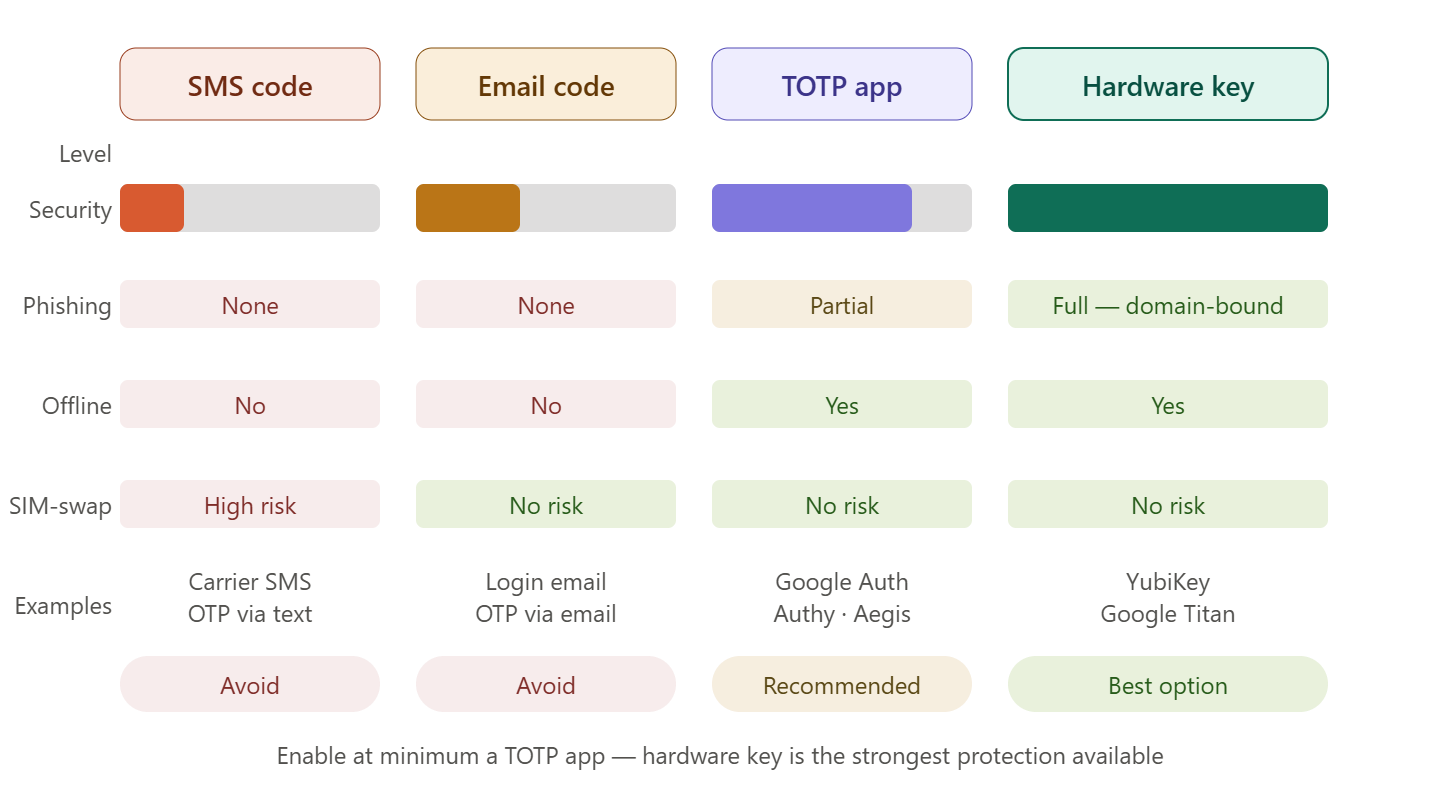
| Parameter | SMS | TOTP App | Hardware Key | |
|---|---|---|---|---|
| Interception protection | Low | Medium | High | Very High |
| Phishing protection | No | No | Partial | Full |
| Offline operation | No | No | Yes | Yes |
| SIM-swap risk | High | No | No | No |
| Setup complexity | Minimal | Minimal | Low | Medium |
| Cost | Free | Free | Free | $50–100 |
| Recommendation | Avoid | Avoid | Basic minimum | Optimal |
What to Do If You Lose Your Phone with 2FA
- Use backup codes — if you saved them during setup.
- Restore using the secret key — if you saved the seed during setup, install a new authenticator application and enter the key manually.
- Contact Cifra X Support — if you can provide identity verification documents, support may help restore access. The process takes time and requires verification.
💡 Helpful Tip
Set up 2FA on two devices at the same time—your primary phone and a tablet or backup phone. If one device is lost, the second one remains available. During setup, scan the same QR code with both devices.