What Is a Limit Order
A limit order is an instruction to buy or sell an asset at a specified price or better. Unlike a market order, which executes immediately at the current market price, a limit order is placed in the order book and waits until the market reaches the specified price level.
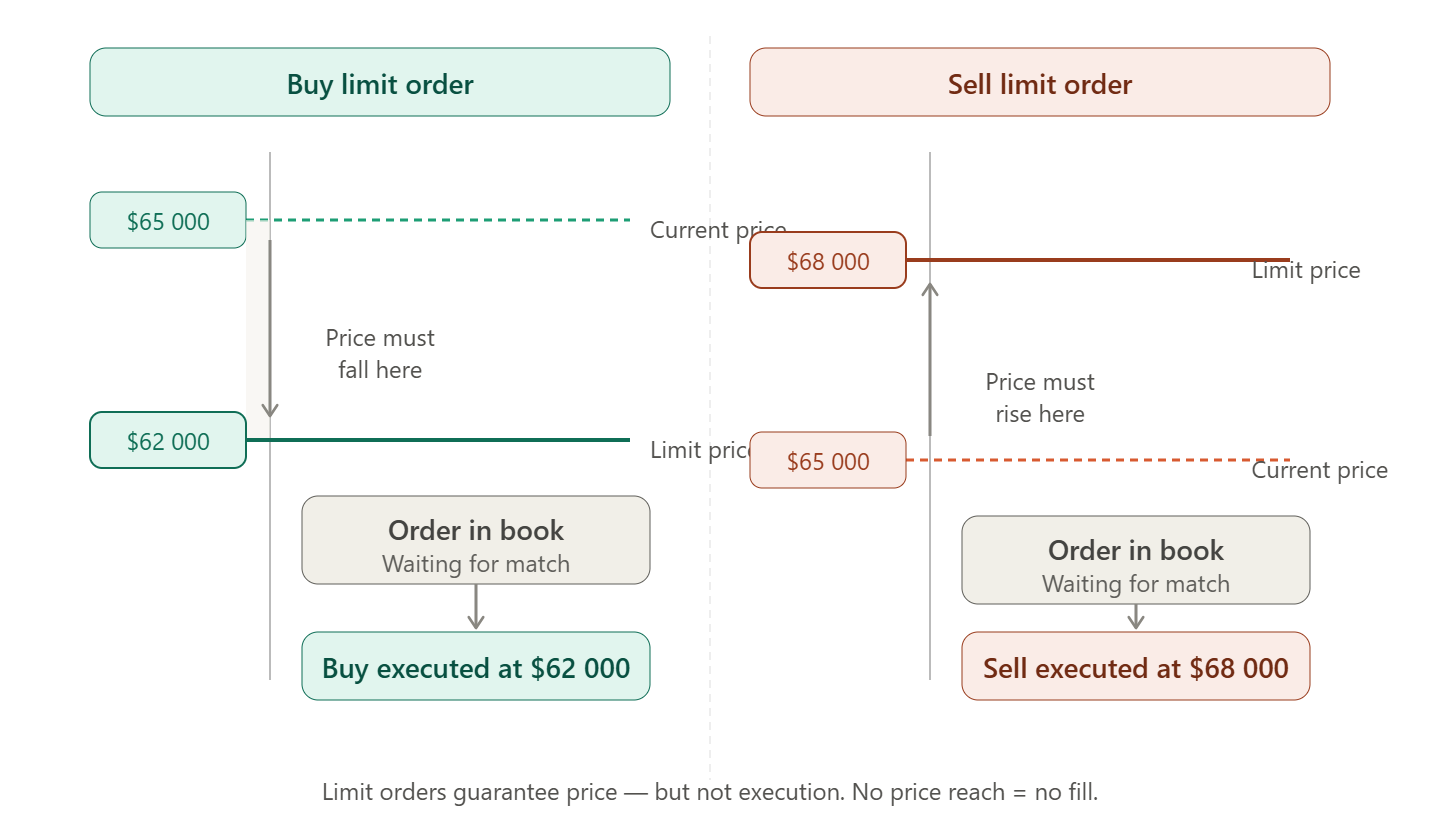
The key characteristic of a limit order is that it guarantees the execution price, but does not guarantee execution. If the market never reaches your specified price, the order will remain in the order book until it is canceled or expires (if an expiration time is set).
How a Limit Order Works
Execution Logic
A buy limit order is executed at the specified price or lower. In other words, you are willing to buy the asset at that price or at a better (lower) price.
A sell limit order is executed at the specified price or higher. You are willing to sell the asset at that price or at a better (higher) price.
| Order Type | Placement Condition | Execution Condition |
|---|---|---|
| Buy Limit | Limit price is below the current market price | The market price falls to the limit price or lower |
| Sell Limit | Limit price is above the current market price | The market price rises to the limit price or higher |
Example
Assume Bitcoin is trading at $65,000. You believe the price will pull back to $62,000 before continuing higher, and you want to buy only at that level.
- You place a Buy Limit order for 1 BTC at $62,000.
- The order appears on the bid side of the order book at $62,000.
- As long as the market price remains above $62,000, the order waits in the order book.
- If the price falls to $62,000 (or lower), the order is executed.
- If the market never reaches $62,000, the order remains active until you cancel it (or until it expires, if applicable).
Limit Order vs. Market Order
| Feature | Limit Order | Market Order |
|---|---|---|
| Price Guarantee | Yes | No |
| Execution Guarantee | No | Yes |
| Execution Speed | Waits for the market | Immediate |
| Slippage | No | Possible |
| Role in the Order Book | Maker | Taker |
| Trading Fee | Lower (maker fee) | Higher (taker fee) |
| Best Used When | You have a target price | Immediate execution is required |
ℹ️ Maker vs. Taker
By placing a limit order, you become a maker, adding liquidity to the order book. As a result, most exchanges charge a lower maker fee than the taker fee paid by traders who remove liquidity with market orders.
Limit Order Execution Conditions
Time in Force (TIF)
When placing a limit order, you can specify how long the order remains active.
| Option | Meaning | Behavior |
|---|---|---|
| GTC | Good Till Cancelled | Remains active until it is executed or manually canceled. |
| IOC | Immediate or Cancel | Executes any immediately available quantity; the remaining portion is canceled. |
| FOK | Fill or Kill | Must be executed immediately in full; otherwise, it is canceled entirely. |
| GTD | Good Till Date | Remains active until a specified date and time. |
| Day | Day Order | Automatically expires at the end of the trading session (primarily used in traditional financial markets). |
On cryptocurrency exchanges, GTC (Good Till Cancelled) is the most commonly used option, allowing an order to remain active until it is either filled or canceled by the trader.
Partial Execution
If there is insufficient liquidity at the specified price level, a limit order may be partially filled. The available quantity is executed immediately, while the remaining portion stays in the order book until additional liquidity becomes available or the order is canceled.
💡 Helpful Tip
Partial fills are common when trading large order sizes or low-liquidity assets. On Cifra X, both the executed and remaining portions of a limit order are displayed in the Open Orders section.
When to Use a Limit Order
Ideal Use Cases
Buying on a Pullback
If the market is rising but you want to enter at a lower price, place a Buy Limit order below the current market price and wait for a correction.
Taking Profit at a Target Price
If you already own an asset and plan to sell it once it reaches a specific price, place a Sell Limit order above the current market price.
Range Trading
When the market is moving sideways, traders often place Buy Limit orders near the lower boundary of the range and Sell Limit orders near the upper boundary.
Trading Low-Liquidity Assets
For assets with wide bid-ask spreads, limit orders help minimize slippage.
When Price Precision Matters
If the expected profit from a trade is relatively small, avoiding even a small amount of slippage can significantly improve overall results.
When a Limit Order May Not Be Appropriate
- When you need to enter or exit a position immediately.
- In fast-moving markets where the price quickly moves away from your specified level.
- For urgent stop-loss protection—in such cases, a Stop Market order is generally more appropriate.
Advanced Limit Order Strategies
Ladder Orders (Scale-In Strategy)
Instead of placing one large order, traders divide it into several smaller limit orders at different price levels. This approach reduces entry-point risk and improves the average purchase price.
Example: Buying $10,000 Worth of BTC
| Order | Price | Amount (USD) |
|---|---|---|
| Buy Limit 1 | $64,000 | $3,000 |
| Buy Limit 2 | $62,000 | $3,500 |
| Buy Limit 3 | $60,000 | $3,500 |
If Bitcoin declines to $60,000, all three orders will be executed, resulting in an average purchase price of approximately $61,900. If the pullback is smaller, only the first order may be filled.
Paired Orders (Buy and Sell Limits)
A trader places both a Buy Limit below the current market price and a Sell Limit above it, seeking to profit from price movement within a trading range.
⚠️ Important
When using paired orders, ensure that you have sufficient available funds for both orders if the market moves sharply in one direction. Some trading platforms reserve funds separately for each active order.
Using a Limit Order Instead of a Stop-Loss
In some situations, traders place a Sell Limit order below the current market price as a softer alternative to a stop-loss. The order will execute only if there are buyers available at that price. Unlike a Stop Market order, however, a limit order does not guarantee execution during a rapid market decline.
Placing a Limit Order on Cifra X
- Select a trading pair, such as BTC/USDT, in the Trading section.
- Open the Limit tab in the order entry panel.
- Enter the desired price at which you want to buy or sell.
- Specify the order size in either the base asset or the quote currency.
- Review the estimated order value.
- Click Buy or Sell. Your order will appear in the Open Orders section.
- Monitor the order status and cancel it if necessary.
💡 Helpful Tip
Before placing a limit order, review the order book depth at your target price. If a large number of orders are already queued at that level, your order will join the FIFO (First In, First Out) queue and may be executed later or only partially.
⚠️ Risk Warning
A limit order that is left unattended may be executed long after market conditions have changed. Regularly review your active orders and cancel any that are no longer relevant—especially orders that remain open for several days or weeks.